All times are UTC+02:00


Post new topic  Reply to topic  [ 16 posts ]  Go to page 1 2 Next
Author Message
PostPosted: Sat May 02, 2026 1:45 am 
User avatar

Joined: Wed Jun 09, 2021 2:16 pm
Posts: 60
Location: Stockholm, Sweden
Hello

I have recently updated my drivers on my broadcasting computer. After that, I have an issue where StereoTool suddenly starts corrupting the audio signal to the soundcard defined in "HD Output". There are no buffer under/overruns or any messages from StereoTool. I installed the supported audiodriver from Soundblaster. After that everything worked fine until the problem reappeared after a few hour. It went from clear signal to audio sounding like a bubbling sound (think frying something). You could still hear what was playing but it was strewn with a popping sound. Shutting StereoTool down and then starting again solved the problem and after that it worked fine for a few hours until it came back without any warning.

Now I have updated StereoTool x86_64 standaline to the latest version.

Hardware:
PC with Intel i9, 32 GB Ram, 2 SSD disks.
Souindblaster Play 3 (running via DirectSound)

Software
Windows 11
PlayIt Live
Voicemeeter Potato
Thimeo StereoTool

The obligatory "Please don't ask"-list: :)
- I have restarted the computer
- The load is high, but the computer still have capacity to spare.
- I have Googled.
- I have update StereoTool

_________________
Enjoy the best of the demo scene and some really cool chiptunes: https://ericade.radio/
My thoughts on pretty much everything: https://erik.zalitis.se/


Top
   
PostPosted: Thu May 07, 2026 12:43 pm 

Joined: Mon Aug 29, 2016 7:35 am
Posts: 76
Hello, I'm using a Sound Blaster AE-9 sound card, with ASIO input and output, and it's on all day without being turned off. So far, I'm having no problems. My computer is an i9, just like yours.


Top
   
PostPosted: Sat May 30, 2026 1:42 pm 
User avatar

Joined: Wed Jun 09, 2021 2:16 pm
Posts: 60
Location: Stockholm, Sweden
Hi

Need to escalate this! As it stands, my station can no longer use Thimeo StereoTool. I use a freeware solution at the time and this is not optimal. What can I do to get this fixed? I have spent $500 on this software and now it cannot even be used. That's not a good situation for me to be in. Please advice.

_________________
Enjoy the best of the demo scene and some really cool chiptunes: https://ericade.radio/
My thoughts on pretty much everything: https://erik.zalitis.se/


Top
   
PostPosted: Sat May 30, 2026 2:13 pm 
User avatar

Joined: Sun Dec 23, 2018 7:44 pm
Posts: 1061
Location: Texas, USA
My kneejerk hunch is it's the audio device. Have you tried a different one? Soundblaster doesn't have a true ASIO driver, which most stations use for greater stability.

Some folks also have experienced issues with power profiles not delivering consistent power to USB devices from time to time, though I haven't experienced this myself.

_________________
NB: I'm not a professional, just a hobbyist, and as such I could be wrong. If so, please, somebody correct me.


Top
   
PostPosted: Sat May 30, 2026 2:36 pm 
User avatar

Joined: Wed Jun 09, 2021 2:16 pm
Posts: 60
Location: Stockholm, Sweden
I have changed the audio cards a number of times. I have used three different ones and also tried MME, DirectSound, Kernelstreaming ... All other softwares ("Rocket broadcaster", "Voicemeeter", "PlayIT Live", "Streamlabs OBS" and more) have no problems whatsoever with the same audiocards. All other causes removed: it points directly at Thime StereoTool.

_________________
Enjoy the best of the demo scene and some really cool chiptunes: https://ericade.radio/
My thoughts on pretty much everything: https://erik.zalitis.se/


Top
   
PostPosted: Sat May 30, 2026 2:50 pm 
User avatar

Joined: Sun Dec 23, 2018 7:44 pm
Posts: 1061
Location: Texas, USA
Quote:
I have changed the audio cards a number of times. I have used three different ones and also tried MME, DirectSound, Kernelstreaming ... All other softwares ("Rocket broadcaster", "Voicemeeter", "PlayIT Live", "Streamlabs OBS" and more) have no problems whatsoever with the same audiocards. All other causes removed: it points directly at Thime StereoTool.
I don't see that you've tried any ASIO-capable hardware for the Standalone. Have you also tried raising the Buffer Size/Diversity Delay slider? It defaults to 1000ms for stability reasons.

Don't some of those software programs support VST plugins (ie: OBS, Rocket Broadcaster)? I feel like you're having problems with the I/O keeping sync, which isn't as much of a factor in the plugins. If all else fails, is it possible to try one of the plugin versions? I see PlayIt Live doesn't support plugins, however.

edit: You mention the load being high. That shouldn't be an issue with your CPU. Have you tried changing the CPU settings in the Resource Usage section?

_________________
NB: I'm not a professional, just a hobbyist, and as such I could be wrong. If so, please, somebody correct me.


Top
   
PostPosted: Sat May 30, 2026 2:51 pm 
User avatar

Joined: Wed Jun 09, 2021 2:16 pm
Posts: 60
Location: Stockholm, Sweden
Hmmm.. Just a thought... I have read through the beta development forums and the release notes a lot, as I have been a ST-user since 2021. And I see a pattern: functionality over stability.

I think the development must be reigned in and priortize fixing longstandning bugs and adressing common problems.

I tried the adaptive compressor a few months ago. It sounded awesome, until it suddenly "dropped" most of the trebble for no apparent reason. This was something I could not find out the reason for and had to go back to the tried and true presets.

Some bugs, like cutting the processing off after a preset time when using WatCat are baffling. And forgetting to put functions back into newer version equally so.

I also have gotten very little response to any bugreports I have ever written. Always something like "try this" or "I don't know either". I have dutifully responded as well as I can and have tried to explain when and how the bugs appear.

I understand that I have no support agreement, so I always try to fix my problems myself first. I only come here when I cannot see that I have done anything wrong or that it's not outside what's reasonably StereoTool's domains.

I do not mean to be controversial, but I feel that this is quite a problem for me by now. Please advice.

_________________
Enjoy the best of the demo scene and some really cool chiptunes: https://ericade.radio/
My thoughts on pretty much everything: https://erik.zalitis.se/


Top
   
PostPosted: Sat May 30, 2026 2:59 pm 
User avatar

Joined: Wed Jun 09, 2021 2:16 pm
Posts: 60
Location: Stockholm, Sweden
> I don't see that you've tried any ASIO-capable hardware for the Standalone. Have you also tried raising the Buffer Size/Diversity Delay slider? It defaults to 1000ms for stability reasons.

I cannot as I use a "watering hole" design. OBS and other programs need to access the sound cards at the same time. ASIO commands the cards and makes this impossible. I have use the same configuration basically unchanged since 2022.

I have had an enormously big buffer causing many seconds of latency for StereoTool for years. I have no buffer underruns in recorded time (years now!). Also note that no other software have had any problems while using default values.

> Don't some of those software programs support VST plugins (ie: OBS, Rocket Broadcaster)? I feel like you're having problems with the I/O keeping sync, which isn't as much of a factor in the plugins.
> If all else fails, is it possible to try one of the plugin versions? I see PlayIt Live doesn't support plugins, however.

I only started using VST-plugins after ST failed. I have only one today: JBB. It replaces ST and has performed perfectly for weeks now. No glitches or anything.

>edit: You mention the load being high. That shouldn't be an issue with your CPU. Have you tried changing the CPU settings in the Resource Usage section?

I have it at 150% and it's been like that for years. Can try to decrease it, though. But I doubt that is the problem.

Buffer underruns are temporary conditions. Once this starts, it goes on until I shut ST down and start it back up. After that, it run perfectly fine until suddenly *boom* it happens again out of nowhere. It can be a few hours, a day or a few days, but it always happens eventually.

_________________
Enjoy the best of the demo scene and some really cool chiptunes: https://ericade.radio/
My thoughts on pretty much everything: https://erik.zalitis.se/


Top
   
PostPosted: Sat May 30, 2026 3:10 pm 
User avatar

Joined: Sun Dec 23, 2018 7:44 pm
Posts: 1061
Location: Texas, USA
Quote:

> I don't see that you've tried any ASIO-capable hardware for the Standalone. Have you also tried raising the Buffer Size/Diversity Delay slider? It defaults to 1000ms for stability reasons.

I cannot as I use a "watering hole" design. OBS and other programs need to access the sound cards at the same time. ASIO commands the cards and makes this impossible. I have use the same configuration basically unchanged since 2022.
I don't think this is necessarily the case when using VoiceMeeter (Potato), depending on how you have it set up. It also has a solid virtual ASIO you can use in ST, while routing the output via VoiceMeeter. Again, it'll take some tinkering, especially since i dont know how you have your audio routed.
Quote:
Don't some of those software programs support VST plugins (ie: OBS, Rocket Broadcaster)? I feel like you're having problems with the I/O keeping sync, which isn't as much of a factor in the plugins.
> If all else fails, is it possible to try one of the plugin versions? I see PlayIt Live doesn't support plugins, however.

I only started using VST-plugins after ST failed. I have only one today: JBB. It replaces ST and has performed perfectly for weeks now. No glitches or anything.
I'm talking about the Stereo Tool plugin. not some other software.
Quote:
>edit: You mention the load being high. That shouldn't be an issue with your CPU. Have you tried changing the CPU settings in the Resource Usage section?

I have it at 150% and it's been like that for years. Can try to decrease it, though. But I doubt that is the problem.
I'm not talking about the processing quality. I mean the Processing Thread Distribution, the first cell on the Resource Usage page.
Quote:
Buffer underruns are temporary conditions. Once this starts, it goes on until I shut ST down and start it back up. After that, it run perfectly fine until suddenly *boom* it happens again out of nowhere. It can be a few hours, a day or a few days, but it always happens eventually.
In this case, click the More settings button at the bottom of the Output cell. There should be a way to auto-restart on buffer issues. At the very least, this should stop you from having to restart ST.

edit: Oh, there is completely new code in the I /O section in the latest betas since you started this thread. Might be worth trying.

_________________
NB: I'm not a professional, just a hobbyist, and as such I could be wrong. If so, please, somebody correct me.


Top
   
PostPosted: Sat May 30, 2026 3:42 pm 
User avatar

Joined: Wed Jun 09, 2021 2:16 pm
Posts: 60
Location: Stockholm, Sweden
Quote:
Quote:

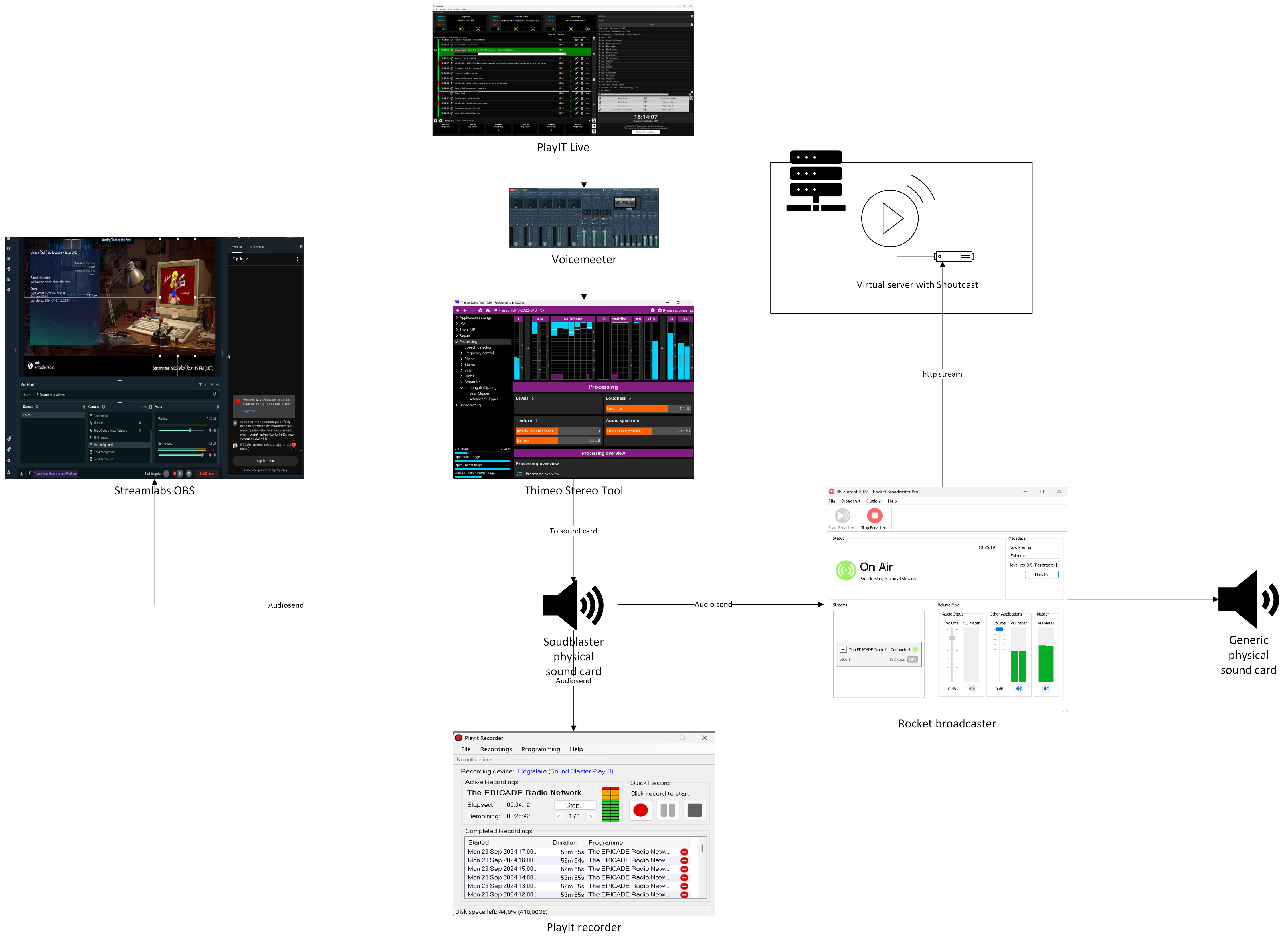
> I don't think this is necessarily the case when using VoiceMeeter (Potato), depending on how you have it set up. It also has a solid virtual ASIO you can use in ST, while routing the output via VoiceMeeter. Again, it'll take some tinkering, especially since i dont know how you have your audio routed.

Here is the design from 2022 (it was changed in May of 2026 after ST failed):
Image

> If all else fails, is it possible to try one of the plugin versions? I see PlayIt Live doesn't support plugins, however.

I tried this in 2021, then it started having weird dropout and I was told not to use the VST-version and switch to the stand alone version.

> I'm not talking about the processing quality. I mean the Processing Thread Distribution, the first cell on the Resource Usage page.

Thanks! I will try that.

> In this case, click the More settings button at the bottom of the Output cell. There should be a way to auto-restart on buffer issues. At the very least, this should stop you from having to restart ST.

Already done that. When the crackling occurs, the buffers are perfectly fine and no problems in sight!

_________________
Enjoy the best of the demo scene and some really cool chiptunes: https://ericade.radio/
My thoughts on pretty much everything: https://erik.zalitis.se/


Top
   
Display posts from previous:  Sort by  
Post new topic  Reply to topic  [ 16 posts ]  Go to page 1 2 Next

All times are UTC+02:00


You cannot post new topics in this forum
You cannot reply to topics in this forum
You cannot edit your posts in this forum
You cannot delete your posts in this forum
You cannot post attachments in this forum

Search for:
Jump to:  
Powered by phpBB® Forum Software © phpBB Limited